
Searching Members
To contact other members:
- Log onto MMM: ManageMyMatch.
- Click on the down arrow on BLTSRC at the top right-hand side of the screen and select ‘About BLTSRC’ (this is the main dashboard).
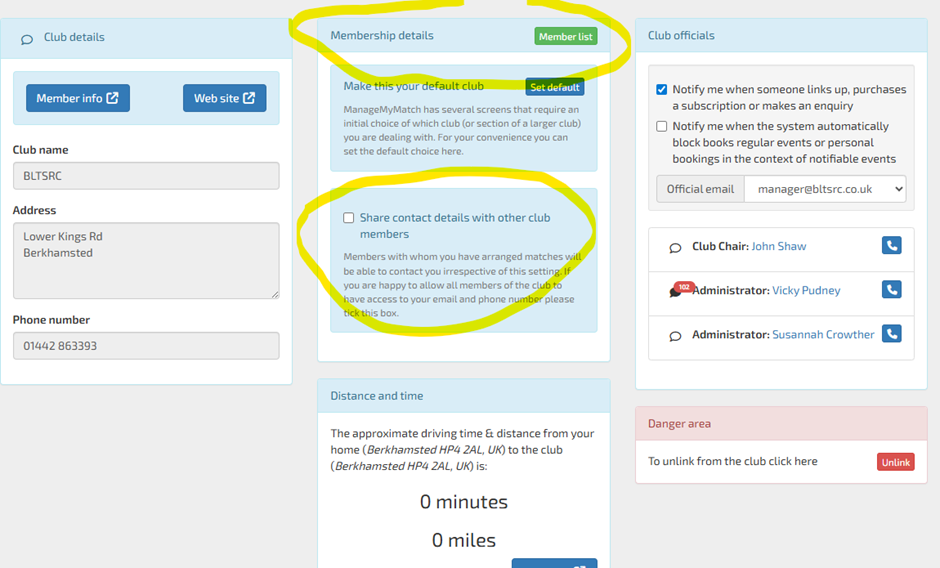
- Then click on the green ‘Member List’ button (see screenshot below).
- Use the search box at the top to go straight to the member in question.
From here you can contact members in 2 ways:
- If a member has allowed their contact details to be shared, their name will show as a link to their email address and the blue ‘phone’ icon will show their phone number.
- To private message another member within the MMM system, click on the speech bubble icon to the left of the member’s name. You will be able to get in touch with all members this way. Members should receive an email prompt to look in MMM for the message.
To make your contact details appear on the list:
- Log onto MMM: ManageMyMatch.
- Click on the down arrow on BLTSRC at the top right-hand side of the screen and select ‘About BLTSRC’ (this is the main dashboard).
- Then tick the ‘Share contact details with other club members’ box. See screenshot below.
Box Players
Please note that you can search your box opponents within your box league portals but will need to make yourselves searchable there too:
Tennis: LTA
Squash: Squash Levels